Microsoft 365 Plans Comparison: F1, F3, Business Basic, Standard, and Premium Guide
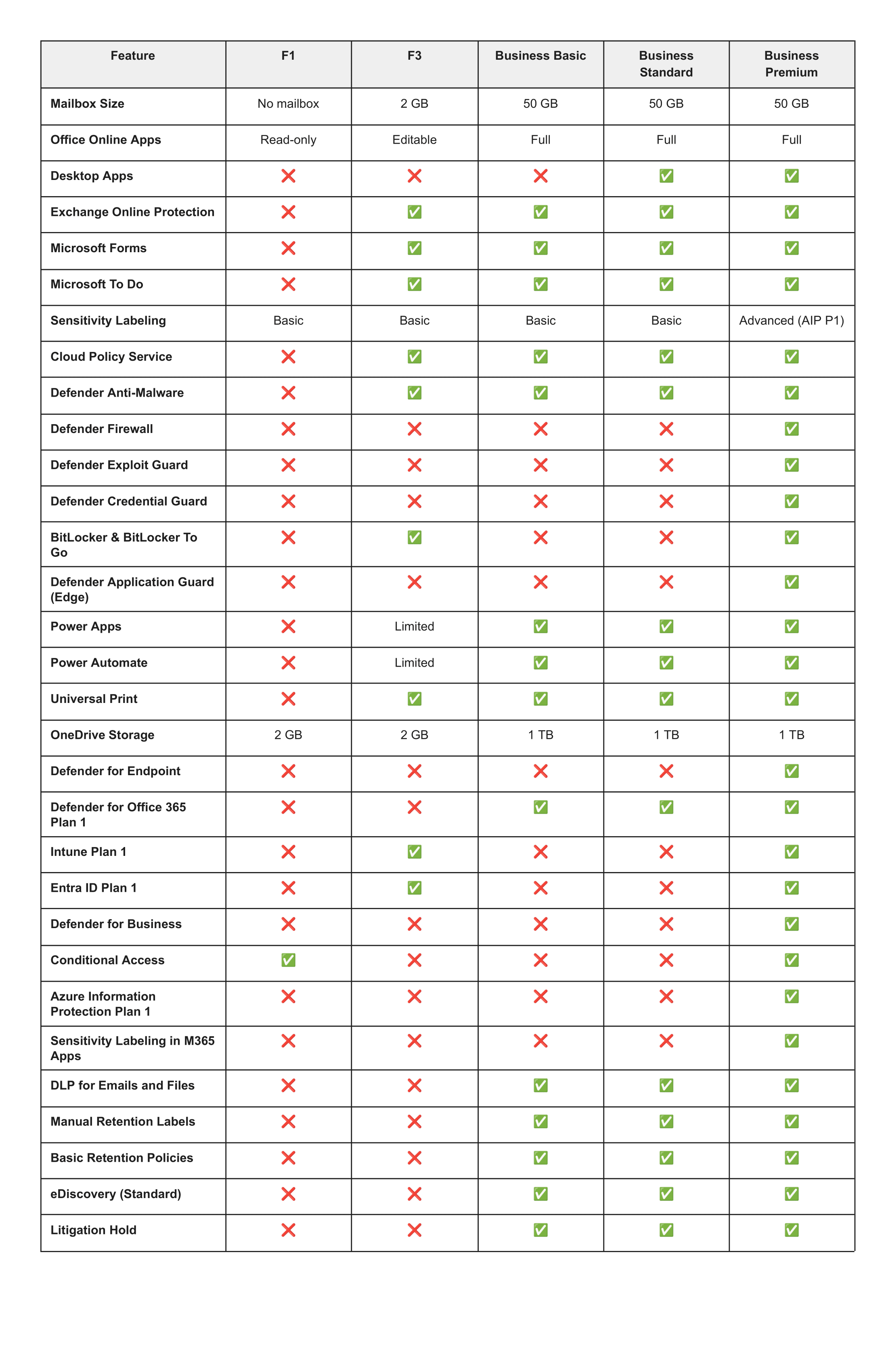
Microsoft 365 plans vary dramatically in mailbox size, security features, and device management capabilities. F1 has no mailbox, F3 includes only 2GB storage, while Business plans offer 50GB mailboxes plus varying security layers, making plan selection critical for productivity and cost optimization.
With numerous Microsoft 365 plans available, it can be challenging to determine which one is best suited for your team. This comprehensive Microsoft 365 plans comparison highlights the key differences between F1, F3, Business Basic, Business Standard, and Business Premium, making it easier to decide based on how your organization works.
What Are the Key Differences Between Microsoft 365 Plans for Productivity and Email?
Choosing the right Microsoft 365 plan starts with understanding what your team needs every day, especially when it comes to email. Mailbox size is one of the most overlooked licensing details, but it is often the root cause of cluttered inboxes, storage issues, and dropped communication.
Microsoft 365 F1: No Mailbox
F1 includes no mailbox at all. This is the most important detail that many organizations miss. F1 is designed strictly for frontline workers who do not rely on corporate email. It also only provides read-only access to Office Online. Microsoft positions F1 for roles such as retail, hospitality, manufacturing, healthcare, logistics, and field service, where employees do not require full email or desktop applications.
Microsoft 365 F3: Limited 2GB Mailbox
F3 includes a very small 2 GB mailbox. This is enough for basic communication, but it fills up very quickly. Many teams end up spending time deleting messages or requesting frequent IT support. However, F3 does include essential features like Intune device management and Conditional Access. That makes it useful for organizations that want stronger device protection for warehouse workers, field technicians, or service staff without paying for larger mailboxes.
Business Plans: Full 50GB Mailboxes
Business Basic, Business Standard, and Business Premium each include a full 50 GB mailbox. This provides enough room for daily communication, attachments, and project threads without constant maintenance. Business Basic gives you full online Office apps but no desktop installations. Business Standard adds the complete desktop suite. Business Premium adds security layers that support modern device and identity protection.
Email remains the backbone of internal and external communication. Giving a user the wrong mailbox size creates workflow friction, more support requests, and lower productivity. A 2 GB mailbox may be appropriate for specific frontline roles, but it should never be assigned to users who rely heavily on email.
Tip: Before choosing a plan, list which team members use email heavily and which ones rarely send or store messages. Anyone communicating with clients, managing tasks, or collaborating across departments should not be placed on F1 or F3.
How Do Microsoft 365 Security Features Compare Across Plans?
As organizations grow, the need for stronger security and device management increases. This is where the Business Premium plan stands apart, but it is also where F3 offers surprising value for frontline environments.
F1 and Business Basic Security
These plans offer only basic email protection. They are meant for very light usage scenarios where the organization is not responsible for securing multiple devices or sensitive data.
F3 Security Features
F3 sits in a unique middle ground. It includes:
- Intune device management
- Entra ID Plan 1
- Conditional Access
- Basic anti-malware protection
This means F3 can support secure sign-ins, mobile device management, policies, and restricted access. These capabilities overlap with some areas of Business Premium, making it ideal for securing frontline teams without overspending.
Business Standard Security
Business Standard is primarily about productivity. It includes full desktop Office apps and 1 TB OneDrive storage, but still does not include deeper device or security controls.
Business Premium Security
This is where complete security and device protection begin. Business Premium includes:
- Intune
- Defender for Business
- Advanced identity and access management
- BitLocker
- Defender Exploit Guard
- Defender for Endpoint
- Conditional Access
- Device-level protection
This plan is designed for organizations with sensitive data, hybrid users, remote endpoints, or regulatory requirements.
If you have multiple laptops, remote workers, client data, or compliance risk, Business Premium delivers significantly more value than Standard or Basic.
Which Microsoft 365 Plan Should You Choose for Your Organization?
When all is said and done, selecting the right plan comes down to matching real business needs with cost and value. Here are some guiding questions:
- How many users truly need installable desktop apps versus online only? (This is the key differentiator between Business Basic and Business Standard.)
- How many endpoints/devices are in use? Are devices unmanaged or remote?
- Do you store sensitive/regulatory data that requires advanced compliance, eDiscovery, and litigation hold?
- Do you require features such as BitLocker, Intune device management, Defender Exploit Guard, or Credential Guard?
- Are some users in "light" roles (just email/online apps) while others are in "power" roles (device management, security, compliance)?
Microsoft 365 Plans Value Recommendations
- For organizations where most users simply need email and browser-based apps, then F1, F3, or Business Basic may hit the sweet spot. Business Basic is the clear choice for teams that need a large mailbox and full online apps without the desktop software cost.
- If you need the full Office experience, installed apps, cloud storage, plus basic protection and collaboration, Business Standard is likely a good fit.
- If your needs extend to managing devices, responding to threats, protecting data, and compliance, then Business Premium gives you significantly more value for the investment.
Mix & match approach: You do not have to standardize on one plan for all users. Some businesses allocate higher-tier licenses only to users who need the advanced features (e.g., device managers, IT, compliance) and give lighter permits to others. This selective approach optimizes cost without compromising capability.
What Is the Best Microsoft 365 Licensing Strategy?
Choosing the "right" plan is not about selecting the most feature-rich or expensive option; it is about choosing the one that aligns with your team's work style, devices, risk profile, and budget.
- Start by listening to your users: What apps do they use? How many devices?
- Map out your security and compliance responsibilities: Are they basic or advanced?
- Consider a phased approach: begin with what you need now, but plan for growth (e.g., you might choose Business Basic now and upgrade to Business Standard or Business Premium later).
And remember: choosing a lighter license when it meets the requirements is not a compromise; it's a smart, cost-effective decision.
Ready to Right-Size Your Microsoft 365 Investment?
Stop guessing and start saving. We help organizations optimize their Microsoft 365 licensing through detailed user profiling and feature mapping to ensure maximum value for every dollar spent.
Schedule Your Free M365 Assessment →